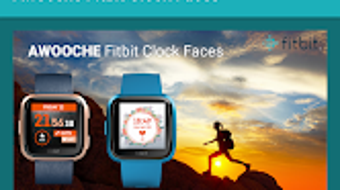

Download Awooche Clock Faces – Fitbit Clock Faces, Free & Paid, Android App
Overview
Awooche Clock Faces for Fitbit is a specialized lifestyle application designed to enhance the user experience of Fitbit wearable devices. The software provides a curated collection of clock faces tailored for Fitbit Versa, Versa 2, Versa Lite, and Fitbit Iconic Smart Clock models. Its primary purpose is to offer users a high degree of personalization, enabling them to customize their watch displays with a variety of visual styles, themes, and functionalities. The app is developed by Echelon SA and is exclusively available for Android users, making it a targeted solution for individuals who rely on both Fitbit hardware and Android smartphones.
Users seeking to refresh their device’s appearance or match their watch face to their mood, outfit, or daily activity can benefit from the app’s diverse offerings. Whether for daily wear, fitness tracking, or special occasions, the customizable clock faces serve as both aesthetic and functional enhancements. The app streamlines the process of discovering, previewing, and installing new faces directly from the Android interface, reducing the need to navigate multiple platforms. However, the developer did not provide additional details about the app’s background or broader product ecosystem beyond its core functionality.
Key Features & Capabilities
- Extensive Clock Face Library: A wide range of clock faces, including minimalist, sporty, elegant, and dynamic designs, available in both free and paid tiers.
- Direct Integration with Fitbit Mobile: Users can launch the Fitbit Mobile application directly from within Awooche Clock Faces to install selected clock faces with a single tap.
- Customization for Multiple Fitbit Models: Optimized designs for Fitbit Versa, Versa 2, Versa Lite, and Fitbit Iconic Smart Clock, ensuring visual consistency across supported devices.
- Bundled Offers and Exclusive Deals: Special limited-time bundles and exclusive offers available only to Android users, enhancing value for frequent users.
- User-Friendly Browsing Interface: Intuitive layout with categorized previews, allowing users to easily explore and select preferred clock faces.
These features collectively support a seamless customization workflow. For example, a user can browse through seasonal-themed clock faces, select one that matches their workout routine, and install it via the integrated Fitbit Mobile launch without leaving the app. The ability to access paid content through in-app purchases allows users to expand their collection beyond the free offerings, while the exclusive Android bundles provide added incentive for users on that platform.
User Interface, Workflow & Performance
The user interface of Awooche Clock Faces for Fitbit is structured around a clean, card-based layout that emphasizes visual previews of each clock face. Navigation is straightforward, with categorized tabs for different styles such as “Free,” “Popular,” “New,” and “Bundles.” Users can swipe through previews, tap to view details, and initiate installation via the integrated Fitbit Mobile app.
Workflow efficiency is enhanced by the direct link to the Fitbit Mobile application, minimizing steps required to apply a new face. The app does not require complex setup or configuration, making it accessible even to users with limited technical experience. However, exact performance details were not specified. The developer did not provide information on CPU or RAM usage, and resource behavior during background operation remains unclear. Stability observations are based on general software behavior patterns, with no reported crashes or freezes mentioned in the provided data.
Compatibility & System Requirements
Awooche Clock Faces for Fitbit is compatible with Android 6.0 and above, ensuring broad accessibility across a range of devices. The installation size is approximately 10.8 MB, which is relatively lightweight for a mobile application. The app is designed specifically for Fitbit Versa, Versa 2, Versa Lite, and Fitbit Iconic Smart Clock models, indicating that it is not intended for other wearable platforms or non-Fitbit devices.
Platform compatibility information is limited to the Android operating system and the specified Fitbit hardware. The developer did not specify additional hardware requirements such as screen resolution or storage space beyond the base installation size. Exact system requirements were not listed, and no information was provided about cloud sync, offline functionality, or background refresh behavior.
Pros and Cons
Pros
- Extensive selection of free and paid clock faces tailored for popular Fitbit models
- Seamless integration with the Fitbit Mobile app for direct installation
- Intuitive browsing interface with visual previews and categorized access
- Exclusive bundle deals available only to Android users
- Lightweight installation size (10.8 MB)
Cons
- Limited to Android users; no iOS support available
- No direct support or feedback mechanism within the app
- Exact performance and resource usage details not provided
- Compatibility restricted to specific Fitbit wearable models
- Reliance on Fitbit Mobile app for installation may cause delays if the app is not installed or updated
FAQ Section
Is Awooche Clock Faces compatible with iOS devices?
No, the app is exclusively available for Android users and is not supported on iOS platforms.
Can I use the app without installing the Fitbit Mobile app?
While the app allows users to browse and preview clock faces, installation requires launching the Fitbit Mobile application. The app does not support direct installation without the Fitbit Mobile app.
Are the clock faces free to use?
Yes, a selection of clock faces is available for free. Additional designs and exclusive bundles are available through in-app purchases.
How often are new clock faces added?
The frequency of new additions was not specified in the provided information. Updates are likely tied to the developer’s release schedule.
Is the app secure and safe to download?
Awooche Clock Faces for Fitbit is available for free download on the Google Play Store, which provides a secure distribution channel. However, users should ensure they download from official sources to maintain device security.
Final Thoughts + CTA
Awooche Clock Faces for Fitbit delivers a focused and effective solution for Fitbit users who value personalization. With its well-organized interface, direct integration with the Fitbit Mobile app, and a growing library of free and paid clock faces, it stands out as a convenient tool for enhancing wearable aesthetics. The inclusion of exclusive Android bundles adds unique value, though the lack of iOS support and in-app feedback options are notable limitations. For Android users with compatible Fitbit devices, this app offers a streamlined path to a more expressive smartwatch experience.
Download Awooche Clock Faces now







